
Coding agents can now change a real codebase from a sentence. The industry's next move looks obvious: let the request go all the way to production. Ticket in, pull request out, merge, deploy.
I think that is the wrong default for changes requested by people who can't read the diff. Not because the models are bad. Because the slow part of a small product change was never the typing, and the last step, a person deciding, is cheap and worth keeping.
This piece lays out the argument and then the concrete architecture we use in Butterneck to keep a human in the loop without making them the bottleneck.
Where a small change actually spends its time
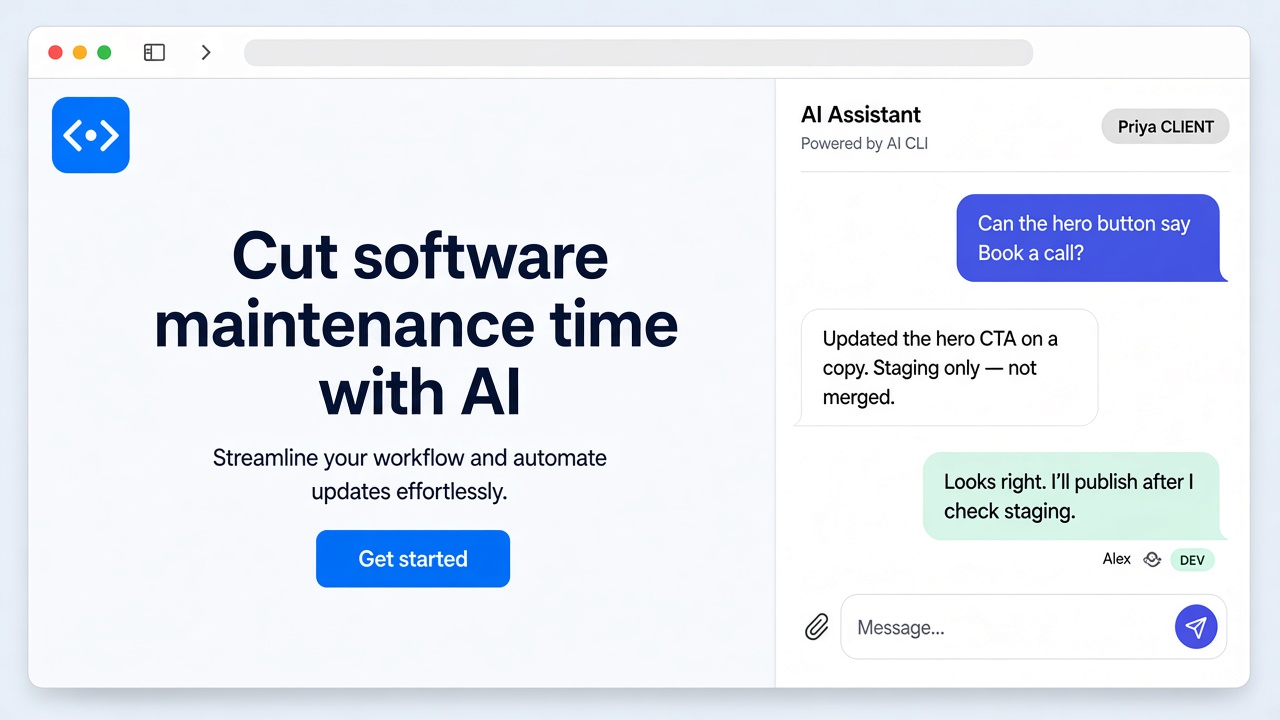
Take "make the button say Book a call". The edit is one line. The time goes to everything around it: which page, which button, a screenshot, someone finds the file, someone sends a link to check, a reply, another tweak.
Or a ticket with a description, a dozen comments and three attachments, where a developer has to work out which comment is the real request.
Agents are good at exactly this: reading context and making the edit. Automating the *decision to ship* saves maybe a minute. It also removes the one check that catches a wrong change before customers do.
Three properties worth designing for
If you want non-developers to ask an agent for changes, I'd argue the system needs three things.
- The request happens next to the thing. The person asking should be looking at the running product, not describing it from memory.
- The change is visible before it's real. They should see the result on the same screen, immediately, without anyone deploying.
- A developer is the only path to production. The agent can edit files. Only a person can make them live.
None of these need new AI. They are plumbing decisions.
The architecture
Here is how Butterneck implements those three properties. I'll keep it concrete.
1. The agent runs where the code already is
A daemon (the bridge) runs on a developer's machine. The developer connects one or more project folders. Each folder can be the main checkout, a fresh clone, or a git worktree under .worktrees/ so several requests can run without touching the working copy.
When a request arrives, the bridge's chat server starts the coding CLI the developer already uses, Cursor, Claude Code, or Antigravity, as a one-shot child process scoped to that folder. Butterneck does not ship a model. The developer's existing agent and its provider terms apply.
Why local? The project already runs there, with its real dependencies, data and dev server. No cloud environment to keep in sync.
2. Requests come in where people already are
There are two entry points:
- A chat widget embedded on the live preview. It sends the page URL along with the message, so "this button" has a referent.
- A Jira Cloud ticket with a
butternecklabel. Title, description, comments and attachments become the request. A note with the preview link is posted back to the ticket.
Developer replies in the thread don't trigger the agent, so the developer can talk to the requester without kicking off another edit.
3. The preview is the running dev server
The bridge starts the app and the server issues a public share URL that relays traffic over the bridge's WebSocket, including hot-reload sockets. When the agent saves a file, the dev server reloads and the requester sees it.
That gives you property 2 with no deploy step. It also means the agent is told never to run a production build mid-turn; the dev server is the preview.
4. Guardrails in layers
- Scope. The system prompt has a mandatory file-access section: only the attached folders, nothing outside.
- Secrets. A built-in ignore list (
.env,.env.*, and the same in any subfolder) is always merged with team-defined globs and included in that section. The agent is told to refuse any part of a request that needs those paths. - Undo. Before each turn, the workspace is snapshotted (via git when available, file copy otherwise). Stopping a turn kills the agent and restores the snapshot.
- Confidence. The agent ends each change with a hidden confidence level (very low to very high), shown to the team as a tag, so reviewers know where to look harder.
- Access. The developer chooses who may send requests: a named list or anyone with the link.
An honest note on layer one and two: they are instructions to the agent plus the CLI's workspace setting, and the CLIs run with their interactive permission prompts skipped. That is not the same as an OS sandbox. If you need hard isolation, run the bridge on a machine or account that has no production secrets. We'd rather say that plainly than overclaim.
5. The merge button doesn't exist
There is no push, no pull request, no merge and no deploy in the bridge or chat server. The output of a turn is edited files in a folder plus a conversation and a live preview.
The developer reviews all three, then commits and ships through the team's normal pipeline, with its tests, CI and code review intact. Or discards it.
"Isn't the human the bottleneck now?"
The developer's job changes from "find, edit, send link, wait, repeat" to "look, decide". That's the trade. The expensive loop moves to the agent and the requester, who iterate on the preview until it's right. The developer sees it once, at the end.
Teams that want ticket-to-merge automation exist, and there are tools for them. This design is for teams where the person asking can't review code and someone still owns what ships.
What this doesn't solve
- It needs a local project folder. Teams living only in cloud IDEs aren't a fit.
- It doesn't replace developers. It assumes one is there and decides.
- Your code context still goes to whichever AI provider your coding CLI uses, and preview traffic passes through Butterneck's relay. "Local" means the edits and the runtime are local, not that nothing leaves the machine.
Closing
Human-in-the-loop is often treated as a temporary crutch until the models get better. I think for product changes it's a permanent design choice: ask freely, preview instantly, ship deliberately.
If that's how you want your team to work with coding agents, Butterneck has a free Starter plan at butterneck.com.