
A product manager spots a problem on the live app. The button label is wrong. The empty state says nothing useful. A form asks for a field nobody needs. The fix is small. Getting it done is not.
This post is about how a PM can change a live app without waiting on engineering, and without engineering losing control of what ships.
Why small changes wait
The change usually takes a developer a few minutes. The wait comes from everything around it:
- Writing a ticket that explains which page, which state, which button.
- Adding a screenshot, then a second one because the first was the wrong screen.
- Waiting for the ticket to reach the top of a sprint.
- A developer asks a clarifying question. You answer a day later.
- A staging deploy so you can check it. You find one more thing.
None of that is coding. It is relay. We wrote about this in human-in-the-loop AI coding: the change is small, the back-and-forth is what takes the week.
What "without waiting on engineering" should mean
It should not mean PMs pushing to production. Most engineering leads will say no to that, and they are right to. Code review, tests, and release steps exist for a reason.
What a PM actually needs is narrower:
- To describe the change on the screen where they see it.
- To see the result quickly, on the real app, not a mockup.
- To iterate ("a bit shorter", "no, the other button") without a new ticket each time.
- To hand a finished, visible change to a developer who decides whether it goes live.
That removes the waiting from the PM's side while keeping the decision with engineering.
The options teams use today
Tickets and screenshots
The default. Works, but every round trip costs a day. The developer still has to find the page and guess the intent.
Give the PM a no-code tool
Fine for marketing pages built in a CMS. Not useful when the change is in the product's own code.
Give the PM an AI coding tool
Some PMs install Cursor or Claude Code and edit the repo. This can work for technical PMs, but it means a local dev setup, git, and a PM opening pull requests. Many teams do not want that.
Let the PM ask on a live copy
The PM asks for the change in a chat on a running copy of the app. A coding agent makes the edit. The preview updates. A developer reviews and publishes. This is the approach Butterneck takes.
How it works in Butterneck
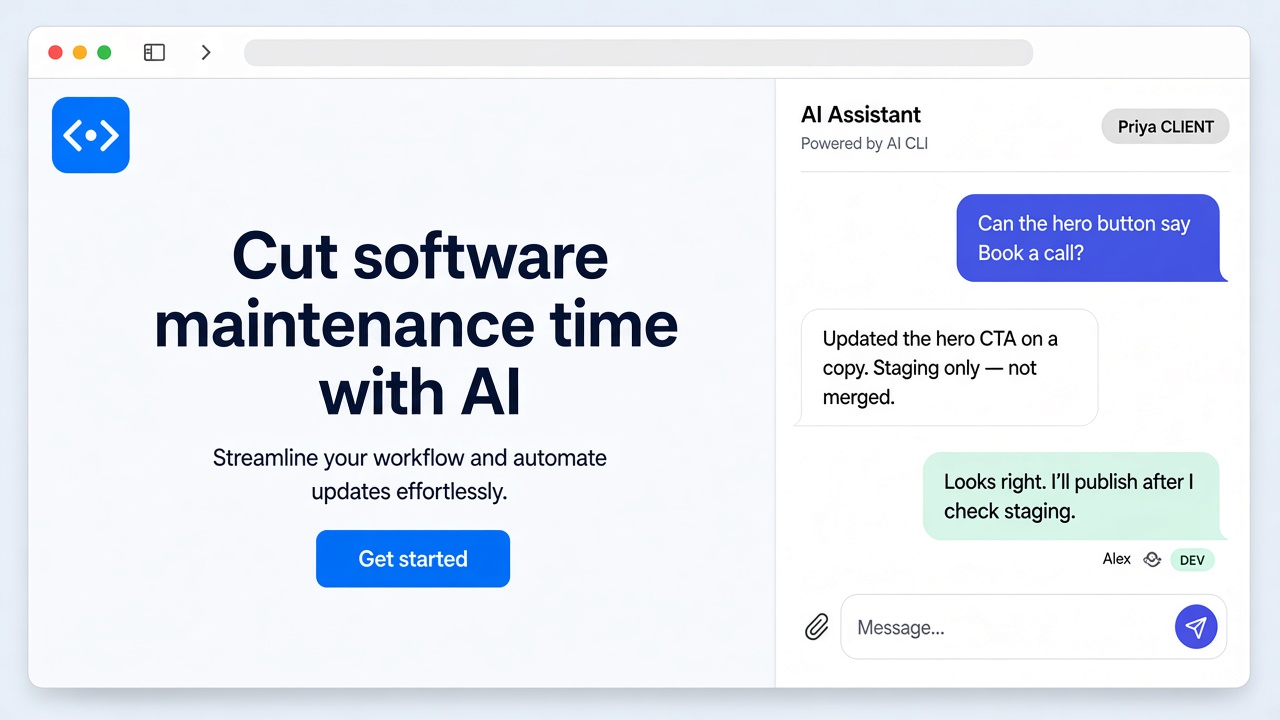
- A developer connects a project folder on their own computer to Butterneck through a small bridge app. The bridge starts the app and gets a public share link for it.
- The PM opens the link. They see the live app with a chat beside it.
- The PM types the change: "Make the button say Book a call."
- A coding agent the developer already uses (Cursor, Claude Code, or Antigravity) edits the files in that folder. The app hot-reloads and the PM sees the change on the same screen.
- The PM keeps going until it is right. If a turn goes wrong, it can be stopped and its file changes rolled back.
- The developer reads the conversation, checks the diff in their own tools, and publishes it the usual way. Or discards it.
Butterneck never merges, never opens a pull request, and never deploys. You decide what goes live.
The share link needs no VPN or staging deploy, and viewers do not need an account. The developer chooses who can send requests: a named list, or anyone with the link. A reply from a developer in the chat does not trigger the AI. More detail in how to share a local app without deploying.
What engineering keeps control of
This is the part to show your CTO.
- The folder. The agent works in one folder the developer chooses. That can be a git worktree, so in-flight requests do not touch the main checkout.
- The ignore list.
.envfiles and any globs the team adds are put in the agent's instructions as off-limits. That is an instruction to the agent, not a hard block, so keep production secrets off the machine that runs the bridge. - The release. Nothing is committed, pushed, or deployed by Butterneck.
- The agent account. The coding CLI runs under the developer's own subscription and its provider terms. The CLI sends code context to that provider, as it does in normal use. Chat messages and preview traffic go through Butterneck's server.
For the full picture, read how Butterneck runs an AI coding agent in a sandbox on your machine.
What a PM should still not do alone
Being clear about limits helps adoption.
- Changes to pricing logic, permissions, or data models need an engineer's eyes, even if the preview looks right. "Looks right" and "is right" are different checks.
- Big features need design and scoping. A live-copy chat is for small, visible changes.
- The developer still reviews every change. Expect that to take minutes, not days, because the intent is already in the conversation.
A simple way to start
- Pick one app and one developer.
- Agree on the kind of changes PMs can request: copy, layout, small UI fixes.
- Share the link with one PM for a week.
- Count how many requests went from ask to reviewed change the same day.
FAQ
Can a PM change a live app without engineering?
A PM can make the change happen and see it on a live copy without waiting. A developer still reviews it and decides whether it ships. That is deliberate.
Does the PM need a dev environment or git?
No. The PM uses a share link in the browser. The developer's computer runs the app and the coding agent.
Does this change the production app directly?
No. The agent edits a copy in a folder on the developer's machine. Production changes only when the developer publishes.
What if the AI gets it wrong?
Ask again in the chat, or stop the turn and its file changes are rolled back. The developer can also just discard the change.
Can requests come from Jira instead of chat?
Yes. Label a Jira ticket butterneck and assign it. A preview link is posted back on the ticket. See from Jira ticket to PR with AI.
Try it
Book a 30-minute demo and bring a real change your team has been waiting on. Or check pricing: Starter is free for one developer and one requester. Learn more at butterneck.com.