
Every product team has a queue of small change requests. Fix this label. Move that field. Update the copy on the pricing card. Each one is minor. Together they eat a surprising amount of a team's week, mostly in handoffs.
AI change requests are a way to shorten that queue: the person asking describes the change, an AI coding agent makes it on a live copy, and a developer approves it. This post covers what that looks like in practice for product teams, what to watch out for, and how Butterneck does it.
What is an AI change request?
A change request is any "can we change X to Y" on a product that already exists. An AI change request is one where an AI coding agent does the edit, not a person reading a ticket.
The useful version has four parts:
- Ask in context. The requester points at the real screen, not a description of it.
- AI edits real code. Not a mockup. The agent changes the project's own files.
- Requester sees the result. On a running copy, right away.
- Developer decides. A developer reviews and publishes, or discards.
Leave out step 3 and the requester is back to waiting. Leave out step 4 and engineering will not let it near the product.
Why product teams need a process for this
Without a process, AI change requests happen anyway, just badly. A PM pastes a screenshot into a chat tool and asks a developer to "just run it through Claude." The developer copies the request, runs the agent, deploys a preview, and sends a link. The AI saved five minutes of coding. The relay still took two days.
A process puts the request, the agent, and the preview in the same place.
How Butterneck handles AI change requests
Requests come from chat or Jira
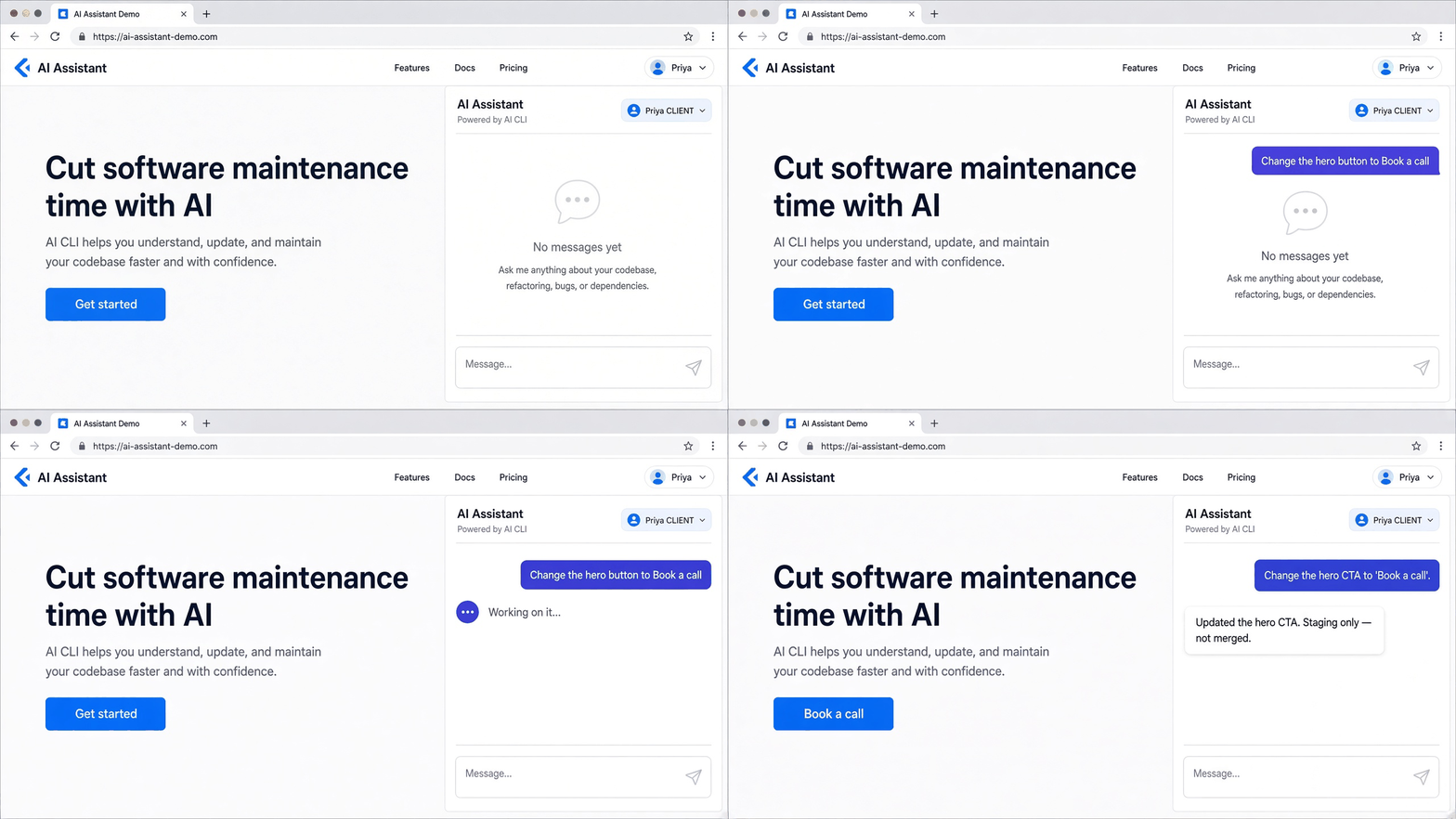
- Chat on a live copy. A developer shares a link to the running app. The requester opens it, sees the app with a chat beside it, and types the change.
- Jira. Label a ticket
butterneckand assign it to someone whose computer has the project. The ticket becomes the request, and a note with a preview link is posted back when the AI is done. Details in from Jira ticket to PR with AI.
The agent runs on a developer's machine
The coding agent is the CLI the developer already uses: Cursor, Claude Code, or Antigravity. It runs on their computer, in a folder they choose for that private copy. Butterneck does not run its own model.
The preview is the app itself
The app runs on the developer's machine and Butterneck gives it a public share link. Hot reload works through the link, so the requester sees the change on the screen they asked from. No staging deploy. See how to share a local app without deploying.
A developer decides what goes live
Butterneck never merges, opens a PR, or deploys. The developer reads the conversation, checks the diff in their own tools, and publishes the usual way.
Who can ask, and how much
Access control matters once more than one person can send requests.
- The developer chooses who can send: a named list, or anyone with the link.
- If the link is closed, a visitor can ask for access. The developer allows or declines.
- Viewers do not need an account.
- A reply from a developer in the chat does not change any files, so developers can answer questions without triggering the AI.
Guardrails to check before you roll this out
These are the questions a CTO should ask any AI change request tool. Here are Butterneck's answers, stated plainly.
- Where does the agent write? Only in the folder tied to the private copy. Git worktrees keep in-flight requests off the main checkout.
- Can it read secrets?
.envfiles and team-added globs are listed as off-limits in the agent's instructions. That is an instruction, not an enforced block. Keep production secrets off the bridge machine. - What leaves the machine? The coding CLI sends code context to its own AI provider. Chat messages and preview traffic go through Butterneck's server.
- Can a bad change be undone? Each turn records a baseline. Stopping a turn rolls its file changes back.
- Can it ship by itself? No. There is no code path that pushes, merges, or deploys.
The longer version is in how Butterneck runs an AI coding agent in a sandbox on your machine.
What kinds of requests fit
Good fits:
- Copy and label changes.
- Layout and spacing tweaks.
- Small UI fixes: a missing state, a wrong color, a broken link.
- Adding or removing a form field when the backend already supports it.
Poor fits:
- New features that need design and scoping.
- Changes to billing, permissions, or data models without close engineering review.
- Anything that needs production data or secrets.
A rollout plan for product teams
- Week 1: One app, one developer, one PM. Requests limited to copy and UI.
- Week 2: Add Jira. Agree on a "small change" definition for the
butternecklabel. - Week 3: Add more requesters through the named list. Keep one developer reviewing.
- After that: Decide which apps and request types are in scope, and write it down.
Track one number: time from request to reviewed change. Compare it with your normal ticket flow.
FAQ
What are AI change requests?
Requests to change an existing product where an AI coding agent makes the edit, the requester sees the result on a live copy, and a developer approves it.
Do requesters need technical skills?
No. They use a share link in a browser, or a Jira label.
Is the AI allowed to deploy?
Not in Butterneck. It edits files in a folder. A developer publishes.
Which AI models are used?
Whichever model the developer's Cursor, Claude Code, or Antigravity CLI is set to use, under their own subscription.
How much does it cost?
Starter is free for one developer and one requester. Pro is USD 19 per person per month, with 20% off annual billing and local-currency pricing. See pricing.
How is this different from tools that open pull requests?
Butterneck stops at a reviewable change on a live preview. For a comparison with a PR-generating tool, read our Itera alternative post, and for the reasoning, human-in-the-loop AI coding.
Try it
Book a 30-minute demo and bring a change request from your backlog. Or start on the free plan from pricing. Learn more at butterneck.com.