
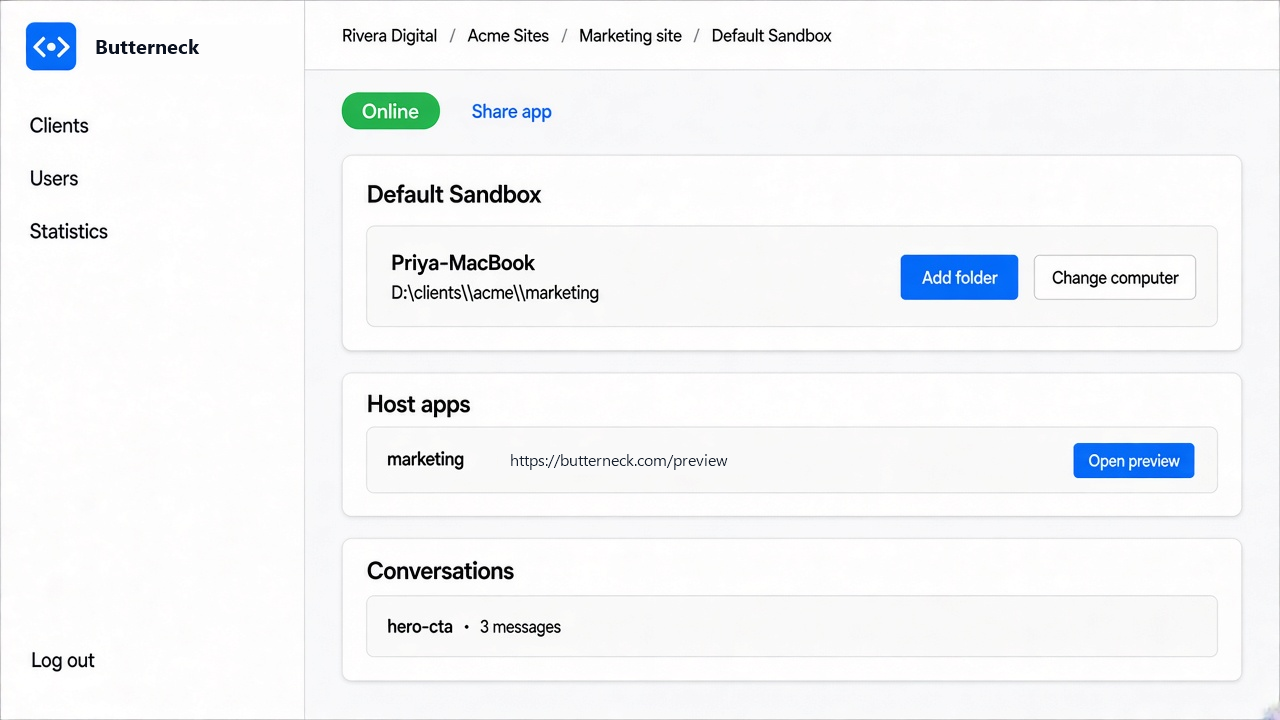
Coding assistants can now edit a real project. Give Cursor, Claude Code, or Antigravity a clear request and a folder, and it will usually find the right file and make the change.
So the obvious next step is to let it go all the way: take the request, change the code, open the pull request, merge it, ship it. Some tools do that.
Butterneck doesn't. It lets the product team hand requests to the AI directly, and then it stops. It never merges. It never opens a pull request. It never deploys. A developer looks at the result and decides whether it goes live.
This post explains why.
What "human in the loop" means here
"Human in the loop" gets used for a lot of things. In Butterneck it means one specific thing:
The AI can change files in the project you connected. Only a person on your team can make that change live.
Everything else follows from that line.
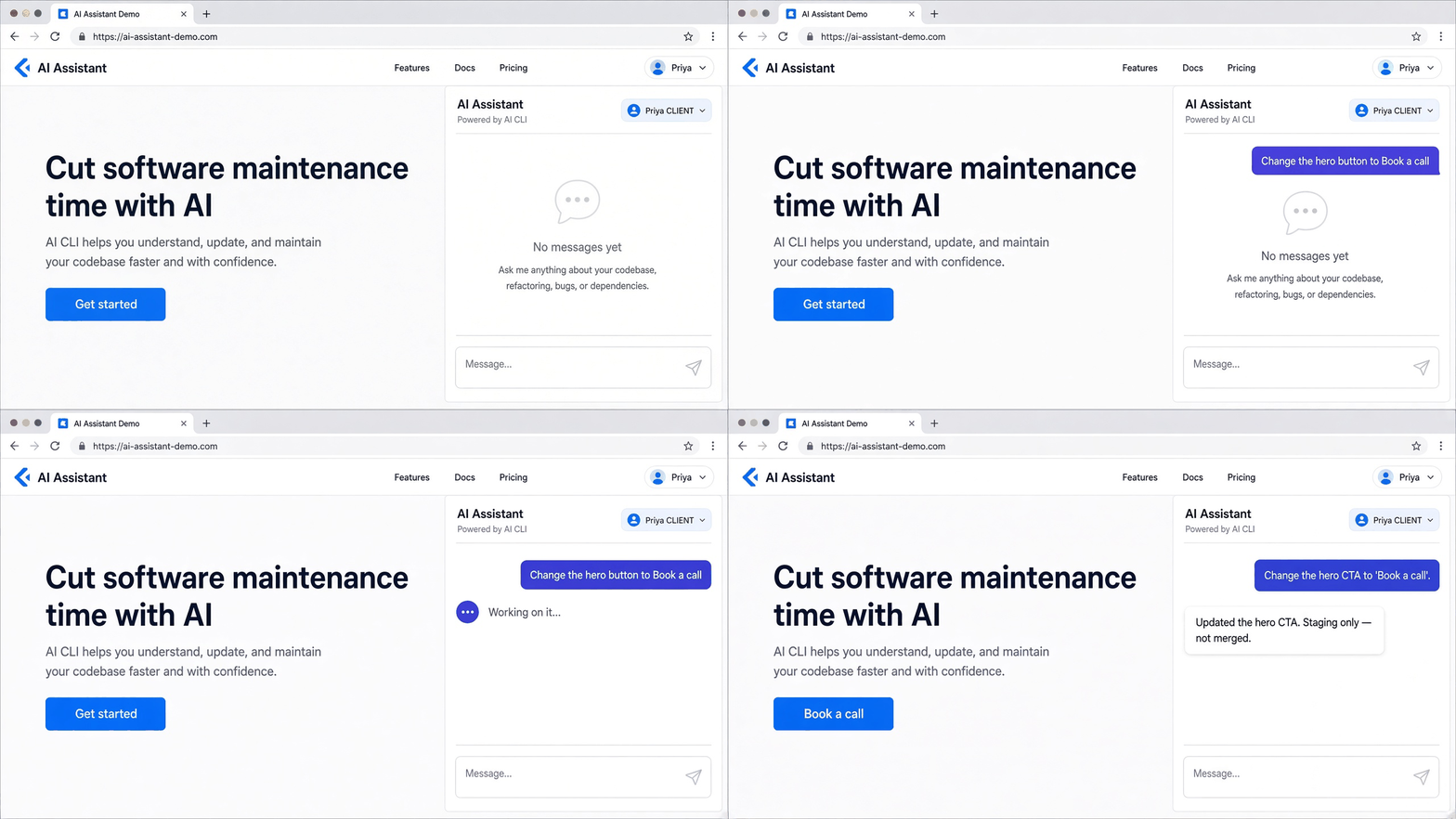
- A product manager or client types a request on a live copy of the app, or a Jira ticket labeled
butterneckstarts the chat. - A coding assistant running on a developer's own computer edits the connected project folder.
- The developer reads the conversation, looks at the running app, and publishes the change the way the team already does. Or leaves it.
Where the time actually goes
The case for full automation assumes the slow part is writing the code. For most small product changes, it isn't.
Take a request like "make the button say Book a call". The edit is one line. The week goes on the messages around it:
- Which page is the button on?
- Is it this button or the one in the footer?
- A screenshot comes back. Someone finds the file. Someone sends a link to check.
Or a Jira ticket with a description, twelve comments, a spreadsheet, and three screenshots. A developer reads all of it to work out which comment is the real request before anyone opens the project.
Butterneck goes after that part. The request is made on the live app, next to the thing it is about, or it comes straight from the ticket, files included. The AI does the reading and the edit. That is the time saved.
The last step, deciding whether the change ships, takes a minute. Automating it saves very little and removes the one check that matters.
Why we don't merge
1. The person asking is often not a developer
Butterneck is built so that a product manager, or a client of an agency, can ask for a change. That is the point. But it also means the request comes from someone who can't review a diff.
If the tool merged on its own, a non-developer's sentence would become production code with no developer ever looking at it. Nobody on a product team actually wants that, even when the AI gets it right most of the time.
2. "Looks right" and "is right" are different checks
The product manager checks that the button now says the right thing. The developer checks the things nobody asked about: did the change touch a shared component, did it break the mobile layout, is the copy now out of sync with the email template.
Both checks are needed. Butterneck puts the first one on the live preview, where the person asking can see it, and leaves the second one with the developer.
3. Your release process already exists
Most teams already have a way to ship: a branch policy, CI, a review rule, a deploy step. A tool that merges for you has to either copy that process or go around it.
Butterneck does neither. The change sits in the project on the developer's computer. They commit, push, open a pull request, or run their deploy, the same way as any other change. Nothing about your pipeline changes.
4. Mistakes stay cheap
When the AI gets it wrong, and sometimes it will, the wrong change stays on one computer. It doesn't land on a shared branch, it doesn't trigger a deploy, and nobody has to revert anything in public. You can stop a turn while it is running and roll back the file changes from that turn.
The guardrails around the AI
Leaving the merge to a person is the main safeguard. There are a few more, all on the developer's side:
- The AI stays in the folder you connected. It works in the project you pointed the bridge at, not the rest of the computer.
- You can block paths. Ignore rules keep the AI out of folders you choose.
- `.env` is always blocked. Secret settings files are off limits, always.
- You choose who can ask. A list of people, or anyone with the link. Someone who is not allowed can request access, and you decide.
- Developer replies don't change files. A developer can answer in the chat without triggering the AI.
- Each private copy is separate. A Jira ticket gets its own copy named after the ticket, and updating the ticket later does not open a second one.
"Isn't this just slower than auto-merge?"
For the one step at the end, yes, by a minute or two. For the whole request, no.
Compare the two flows for "make the button say Book a call":
The usual way
- The product manager writes it in Slack.
- The developer asks which page. A screenshot comes back.
- The developer opens the project, finds the button, changes it, and sends a link to check.
- The product manager replies. Maybe there is another round.
With Butterneck
- The product manager types that sentence on the live copy of the app.
- The AI finds the button and changes it. The preview updates.
- The developer opens the page and decides whether it goes live.
The developer's time goes from "find, change, send, wait" to "look and decide". That is the trade we care about.
Who this is for, and who it is not for
It fits teams where:
- A product manager or client asks for many small changes to a product that is already running.
- A developer is happy to review and publish, but tired of being the message carrier.
- The project lives on a computer the team controls.
- Agencies look after client web apps and want clients to ask on the app itself.
It is not a fit if:
- You want the AI to open pull requests or merge automatically.
- There is no local project folder, for example a team that works only in a cloud IDE.
- You are looking for a replacement for developers. Butterneck assumes there is one, and that they decide.
What it runs on
Butterneck does not ship its own model. It uses the coding assistant the developer already has signed in on their computer: Cursor, Claude Code, or Antigravity. The computer needs Node.js 22 or newer. The developer installs a small connector, points it at the project, and starts the app. Everyone else opens the live copy.
If you want the details of the sharing side, read Share your local app with stakeholders without deploying it.
Try it
Starter is free for one developer and one person who asks for changes. Pro is priced per person per month, with 20% off annual billing. See pricing, or the FAQ for who publishes and where file changes happen.
Let them ask. You decide what goes live.